Back to Smartcitizen.me

SCK2.1 not connecting - poss ESP fault?

Hi there,

We have a SCK2.1 that has been running well for 5 years, but dropped out back in April 2025:
https://api.smartcitizen.me/ui/devices/13114#
When we looked at it, it had a solid blue light, so we did a soft reset (power cycle). It then had a breathing blue light, but still not posting data.

Finally got round to looking at it - I have tried a soft reset, updating the firmware (to SAM_firmware_sck2.uf2) and a factory reset. I occasionally in that process was able to connect to the local access point, but generally it would not appear.

I then connected via serial monitor in Arduino IDE, and saw that the board was repeatedly saying:

Restarting ESP...
ESP off...
ESP on...

So then the next time it happened to get the ESP to start, I tried updating the ESP firmware via the Local Access Point page.

This has not worked - the board is still repeatedly turning the ESP off and on again, and has not yet been able to get the ESP to start at all.

Do we have a faulty ESP? If so, should I simply solder on a replacement?

I have the same problem. Any suggestion?
Thanks in advance.

Hi,

Are there any signs of ā€œcorrosionā€ on the ESP, something like blue residue or similar?

If using a SCK2.1, I’d first flash the SAM with: https://github.com/fablabbcn/smartcitizen-kit-2x/releases/download/0.9.11/SAM_firmware_sck21_air.uf2

The ESP is not booting, it can be because of an incompatibility between the SAM and the ESP firmware. The only way to flash it in this state, since you don’t have the AP to make an OTA upgrade, is to follow this guide: Upgrading the firmware - Smart Citizen Docs

You need to do specifically.

  1. Clone the firmware repository (recursing submodules). You can avoid this by downloading the firmware from GitHub - fablabbcn/smartcitizen-kit-2x: Smart Citizen Kit 2.X hardware and firmware and, in the tools folder, downloading the tools repo GitHub - fablabbcn/smartcitizen-tools: Tools for the development, production, testing and logistics of the Smart Citizen sensors and putting its content in the tools folder
  2. Install python and the requirements you find in the tools folder
  3. Paste the https://github.com/fablabbcn/smartcitizen-kit-2x/releases/download/0.9.11/ESP_firmware.bin in the bin folder in the firmware directory
  4. Run:
python make.py flash esp -v

Thanks, I shall check for the corrosion/residue you describe.

The releases page here states that [SAM_firmware_sck21_air.uf2] you recommend is for SCK2.1 versions with Urban Board and Air sensors connected to the auxiliary port - we don’t have an air sensor on the aux port, is that going to be an issue?

I’ll try the CLI for updating the ESP as you describe, thank you!


No corrosion / blue residue that I can see…

1 Like

I’m having some trouble with Python here - getting the following errors:

Traceback (most recent call last):
  File "C:\Users\user\Desktop\smartCitizen fault Nov25\smartcitizen-kit-2x-master\smartcitizen-kit-2x-master\make.py", line 54, in <module>
    kit = sck.sck(check_pio_sam='sam' in sys.argv, check_pio_esp='esp' in sys.argv)
  File "C:\Users\user\Desktop\smartCitizen fault Nov25\smartcitizen-kit-2x-master\smartcitizen-kit-2x-master\tools\sck.py", line 44, in __init__
    self.paths['base'] = str(subprocess.check_output(
                             ~~~~~~~~~~~~~~~~~~~~~~~^
        ['git', 'rev-parse', '--show-toplevel']).rstrip().decode('utf-8'))
        ^^^^^^^^^^^^^^^^^^^^^^^^^^^^^^^^^^^^^^^^
  File "C:\Users\user\AppData\Local\Programs\Python\Python313\Lib\subprocess.py", line 472, in check_output
    return run(*popenargs, stdout=PIPE, timeout=timeout, check=True,
           ~~~^^^^^^^^^^^^^^^^^^^^^^^^^^^^^^^^^^^^^^^^^^^^^^^^^^^^^^
               **kwargs).stdout
               ^^^^^^^^^
  File "C:\Users\user\AppData\Local\Programs\Python\Python313\Lib\subprocess.py", line 554, in run
    with Popen(*popenargs, **kwargs) as process:
         ~~~~~^^^^^^^^^^^^^^^^^^^^^^
  File "C:\Users\user\AppData\Local\Programs\Python\Python313\Lib\subprocess.py", line 1039, in __init__
    self._execute_child(args, executable, preexec_fn, close_fds,
    ~~~~~~~~~~~~~~~~~~~^^^^^^^^^^^^^^^^^^^^^^^^^^^^^^^^^^^^^^^^^
                        pass_fds, cwd, env,
                        ^^^^^^^^^^^^^^^^^^^
    ...<5 lines>...
                        gid, gids, uid, umask,
                        ^^^^^^^^^^^^^^^^^^^^^^
                        start_new_session, process_group)
                        ^^^^^^^^^^^^^^^^^^^^^^^^^^^^^^^^^
  File "C:\Users\user\AppData\Local\Programs\Python\Python313\Lib\subprocess.py", line 1554, in _execute_child
    hp, ht, pid, tid = _winapi.CreateProcess(executable, args,
                       ~~~~~~~~~~~~~~~~~~~~~^^^^^^^^^^^^^^^^^^
                             # no special security
                             ^^^^^^^^^^^^^^^^^^^^^
    ...<4 lines>...
                             cwd,
                             ^^^^
                             startupinfo)
                             ^^^^^^^^^^^^
FileNotFoundError: [WinError 2] The system cannot find the file specified

What do you mean by ā€˜firmware directory’? I presumed that meant the firmware repository root directory but maybe I got that wrong?

I have updated the board to SAM_firmware_sck21_air.uf2
and now getting ESP not starting!!! Connecting to Wifi... repeatedly through serial monitor in Arduino IDE. Occasionally it does connect, and even says it posts data, but generally not.

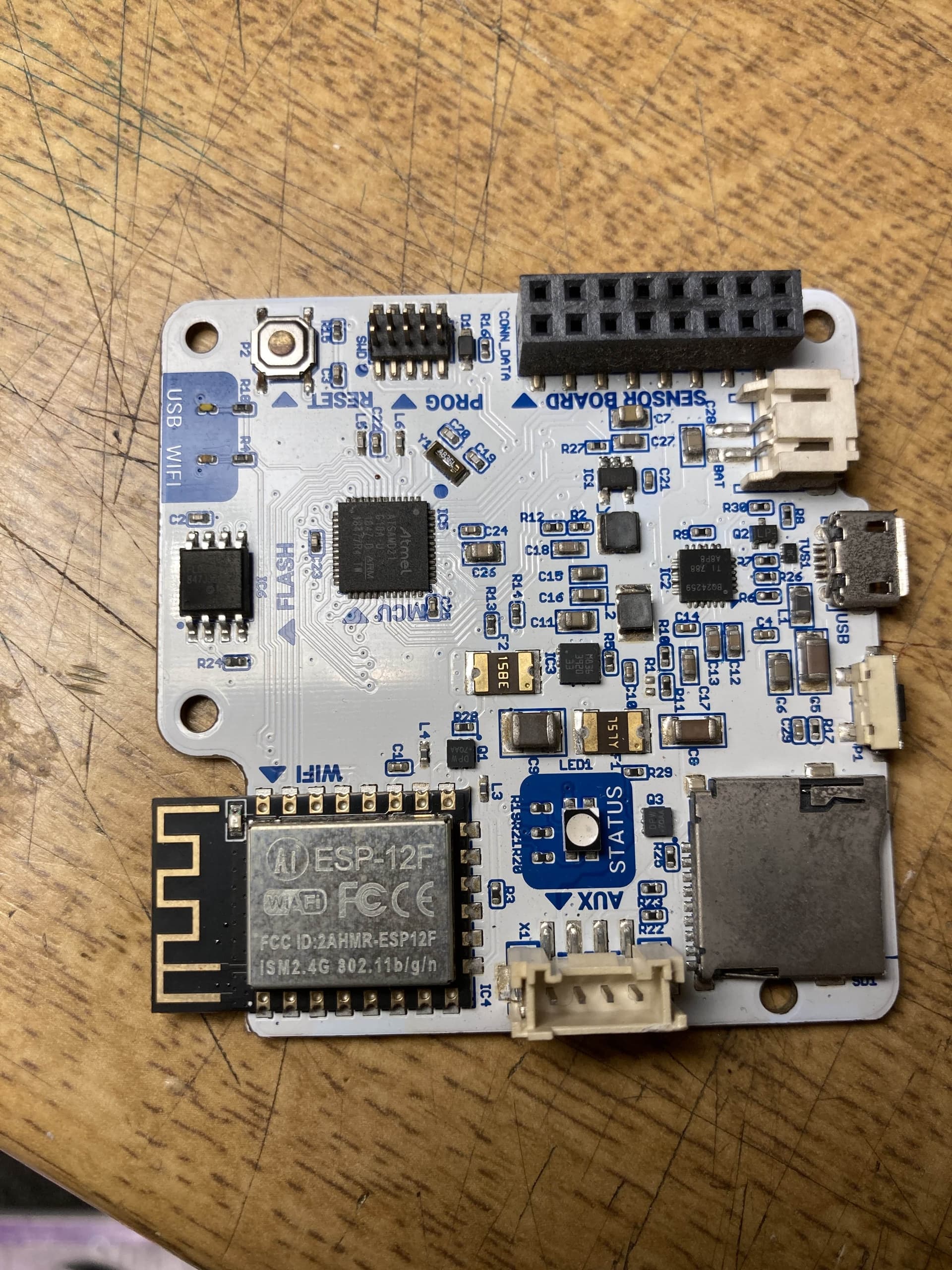
Yes, the ESP, and the board in general, looks perfect. The firmware is the same, no matter of you have sensors on the AUX port, no worries. Also, the folder structure seems well set, don’t worry about the firmware directory either.

It seems like you don’t have git installed and that is actually a requirement on our python scripts. You can circumvent this by going to:

And typing the following instead of what’s there:

self.paths['base'] = <full-path-to-firmware-folder>

Make sure to keep indentation as is. Where <full-path-to-firmware-folder> is the path to where you downloaded the firmware:

"C:\Users\user\Desktop\smartCitizen fault Nov25\smartcitizen-kit-2x-master\smartcitizen-kit-2x-master"

(I assume). I haven’t tested this.

1 Like

Still not having much luck here, but I did manage to connect briefly and tried an OTA ESP update, here is my version info now:

Hardware Version: 2.1

SAM Hardware ID: C8A7077050515157382E3120FF14173D

SAM version: 0.9.11-49b152f-master-sck21_air

SAM build date: 2025-09-25T21:40:51Z

ESP version: 0.9.9-49b152f-master

ESP build date: 2025-09-25T21:41:37Z

Is that up to date? If so, then its not helped with the ESP booting problem, because it is still largely not starting up.